Clay County, Florida runs a public Building Permit Search application where anyone can look up county building permits by permit number, street number, street name, contractor, company, owner name or parcel number, then filter to open or closed permits. For a roofer, those dated records show which houses on a street have had a roof permit and which have not.
Picture a sales manager whose crew wraps a tear-off on Tuesday and has nothing booked for Thursday. He can buy a shared lead and race three other companies to the same homeowner. Or he can spend half an hour in a public permit database and come out with a street of houses nobody has knocked yet. Both work. The second one takes some setup, and it gives you homeowners who have not called anybody.
What follows covers how the Clay County tool works, what its filters mean, what Florida law says about the records, and how to turn a search into a list your canvassers can work this week. The same method carries over to the permit lookup you use for Duval jobs.
How do you search Clay County building permits online?
You open the county's permit search application, enter one value such as a street name or a parcel number, choose a permit status filter, and run the search to see the matching Clay County building permits.
The application describes itself in one line: "Use this application to search for and view Clay County Building permits." It is a lookup tool. You search, you read, and you write down what matters to you. Nothing on it ranks homes or tells you which roof is next, so the value comes from how you search and what you do with the results.
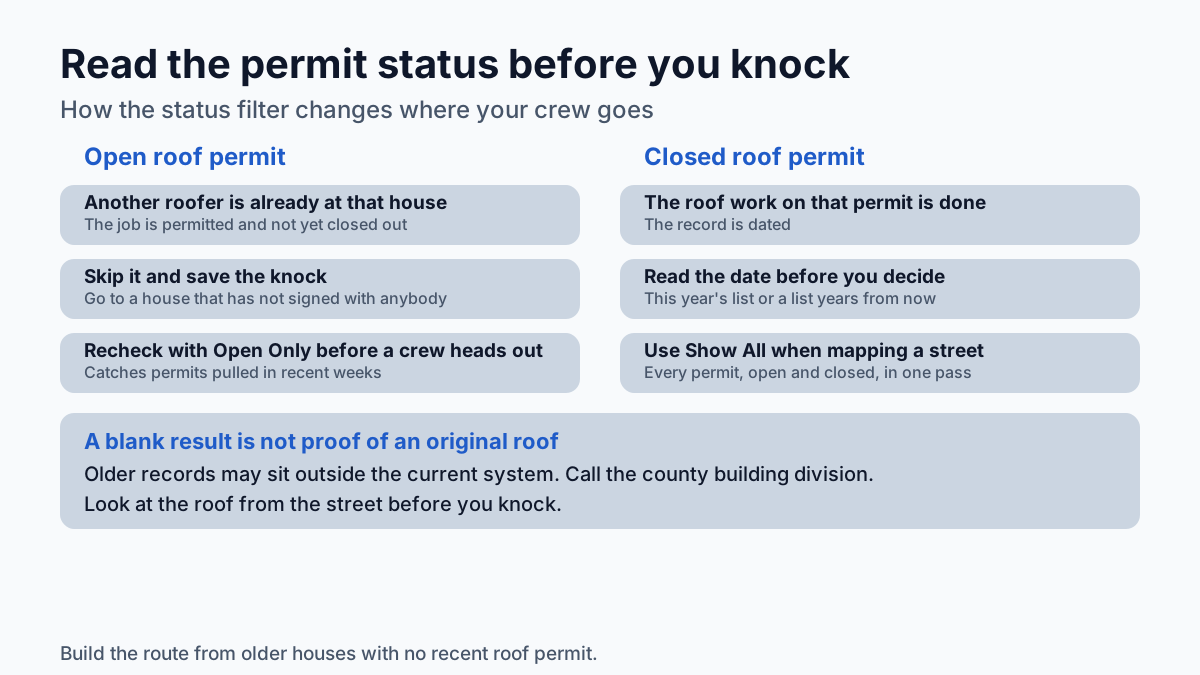
One caution before you rely on it. If a house you expect to have a permit history shows nothing, do not write it off as an original roof on the spot. Counties change permitting software over the years, and older records do not always live in the same place as newer ones. A short call to the county's building division about where older permits are kept will save you from misreading a blank result.
What search fields does the permit search offer?
The search offers eight fields plus a status filter: permit number, street number, street name, contractor number, contractor name, company name, owner name and parcel number, with the status filter set to Show All, Open Only or Closed Only.
Each field answers a different sales question. Here is how they line up for a roofing company:
| Search field | What it does for a roofer |
|---|---|
| Street name | Pulls the permits on one street, so you can see which houses have had roof work and which have not |
| Street number with street name | Checks one address before a knock, a door hanger or a mailer |
| Parcel number | Ties a permit to one specific lot when addresses are confusing, such as corner lots or newly named streets |
| Owner name | Shows permits pulled under a given owner's name |
| Contractor name, contractor number or company name | Finds your own past jobs, and shows which streets already have crews on them |
| Permit number | Pulls up one permit a homeowner mentions to you |
Street name is where prospecting starts. The other fields are for checking your work. A canvasser who confirms an address by street number before knocking does not waste a pitch on the house that was re-roofed last spring. Searching your own company name is a quick way to rebuild a list of past customers, and their neighbors are the next doors to knock.
What do the Open Only and Closed Only filters tell a roofer?
The status filter splits results three ways: Show All returns every permit that matches your search, Open Only returns permits that are still open, and Closed Only returns permits that have been closed.
For prospecting, each one has a job. An open roof permit means a job has been permitted and not yet closed out, so another roofer is already at that house. Skip it and save the knock for someone who has not signed with anybody. A closed roof permit tells you the roof work on that permit is done. Read the date and decide whether that house belongs on this year's list or a list five years from now.
Show All is the setting for building history. When you are mapping a street, you want every permit, open and closed, so you can see the full record of each address in one pass. Use Open Only right before a crew heads out, as a last check that nobody pulled a roof permit on your target streets in the past few weeks.
Are building permit records public in Florida?
Yes, Florida's public records law declares state, county and municipal records open for personal inspection and copying by any person, and a county permit search is one of the easiest places to reach that kind of record.
That matters for a roofer because it means the permit history of every house on your route is open to you, the same as it is to any other contractor, appraiser or homeowner. You are not buying anything or asking anyone's permission to read it.
Reading a record and contacting the person on it are two separate questions, though. Calling homeowners falls under the federal Do Not Call registry and the TCPA, and calling and texting in Florida also fall under Florida's telephone solicitation law (Fla. Stat. 501.059). Do not run a cold list through an autodialer or a texting tool. If phone outreach is part of your plan, check the program with your attorney first. Door knocking has its own local rules in many places, so confirm what the city or county you are working in allows before a crew starts on a new street.
How can a roofer use permit records to find roofs that are due?
Search a street by name, note every house with a roof permit and its date, and put the older houses with no recent roof permit at the top of your list. The permit trail is the dated record of when each roof was last done.
The logic is simple once you see it on a real street. A subdivision built over two or three years got its roofs at roughly the same time, so those roofs age together. As they come due, some owners re-roof and a permit shows up. The ones who have not re-roofed yet show nothing new. Those houses are your list. The owners who already replaced are not prospects for years, and the permit search tells you which ones they are before you spend a morning knocking.
Pair the permit search with each house's age before you rank a street. A house built decades ago with no roof permit on file is a different conversation from a house built recently with no roof permit. The first one is a likely re-roof. The second one may just be young.
Think of a crew working the neighborhoods off Blanding Boulevard on the Orange Park side. If one street has five houses with closed roof permits from the last few years and nine with nothing, those nine are the morning's route. The five can wait.
What does a missing roof permit mean?
A missing roof permit means the search returned no roof permit for that address, which can point to an original roof, work done without a permit, or a record kept outside the current system, so treat it as a reason to look closer.
Look at the roof from the street before you knock. You know what a tired roof looks like, and what you see from the curb tells you more about the conversation ahead than any database. A roof that looks fresh with no permit on file is a house to move past without comment.
Never open a pitch by telling a homeowner their roof work was not permitted. You do not know that, and it puts them on the defensive before you have said your name. Lead with what you can see and offer an inspection. If the homeowner mentions a roofer who did work years ago, that is useful too: you now know the roof's rough age from the person who lives under it.
How do you turn a permit search into a canvass or mail route?
Pick one subdivision, search each street by name with Show All, record every address with its last roof permit date and status, then sort the list so houses with no roof permit come first and open roof permits come off.
Here is the order that keeps the work manageable:
- Choose the streets. Pick subdivisions where most houses were built in the same few years.
- Search each street name with Show All selected.
- Put every address in a spreadsheet with its parcel number, last roof permit date and permit status.
- Remove any house with an open roof permit, and move houses with recent closed roof permits to a later list.
- Group what is left into routes a canvasser can cover in one morning.
- For mail, confirm the owner's name on the current property record. An older permit can carry a previous owner's name, and a mailer addressed to someone who moved out is a wasted piece.
Track what each route produces. A street that took two hours to build and walk and produced one signed re-roof gives you a cost per signed job you can compare against what you pay for shared leads or ads. Cost per lead tells you what you paid to start a conversation. Cost per signed job tells you what you paid for revenue, and it is the number that decides where next month's budget goes.
Where do permit records fall short for prospecting?
Permit records show what was permitted and when, but they do not show a roof's condition, the owner's plans or a phone number, so a permit-based list tells you where to look and still needs a canvasser to close.
The search fields cover permits, addresses, contractors, companies, owners and parcels. There is no field for a phone number, so plan around doors, door hangers and mail. That fits the calling rules above anyway.
The bigger limit is time. Searching street by street, one county at a time, copying results into a spreadsheet and cross-checking build years is slow. A sales manager who does it well can build a strong route for a Saturday. Doing it across a whole ZIP, every month, is a part-time job. Good operators handle that one of two ways: they assign the research to a coordinator and protect that time on the calendar, or they buy the research already done and spend their own hours on the doors.
How does the same search work for Duval and Jacksonville jobs?
The method carries over unchanged: the Clay tool covers Clay County permits, so Duval jobs need their own permit records, but you still search by street, read the roof permit dates, and build the route from the older houses with no recent roof permit.
The Clay tool is useful when your crews work across the county line. For most Jacksonville roofers, though, the home market is Duval, and the streets that pay are there. Take a hypothetical 1990s subdivision in Mandarin. Every house on a cul-de-sac got its first roof in the same window. Some owners have replaced. The rest, as far as the record shows, are still on the original roof, and the permit trail separates the two groups faster than driving the block ever will.
Roof Identifier does that sorting for Duval County: it ranks homes by how likely the roof is due, using public property and building permit records, and holds each ZIP for one roofer at a time under Territory Lock. If you want to see what that looks like on your own streets, ask for a free ZIP Roof Report for your ZIP, or check whether your ZIP is still open.
Frequently asked questions
Can anyone use the Clay County permit search?
Yes. Clay County's application exists to let people search for and view Clay County building permits, and Florida's public records law opens county records to inspection and copying by any person.
Can I look up Clay County permits by roofing company?
Yes. The search accepts a contractor number, contractor name or company name, which makes it a quick way to find your own past jobs and see which streets already have crews on them.
What should I do when a house shows no permits at all?
Treat a blank result as a reason to look closer. Check the roof from the street, and ask the county's building division where older permits are kept before you assume the roof is original.
Does a permit search give me homeowner phone numbers?
No. The search fields cover permits, addresses, contractors, companies, owners and parcels, so plan outreach around doors, door hangers and mail, and check any phone program with your attorney because Florida's calling and texting rules are strict.